
OAuth 2.0 authorization
Approved Solution Providers help automate key parts of a Walmart Marketplace business, such as inventory management and order processing, using secure OAuth 2.0 authorization.
The Walmart Marketplace app store authorization workflow uses an industry-standard OAuth 2.0 token-based model for authentication and authorization. This workflow allows a seller to grant a third-party application access to protected data in Seller Center without sharing credentials.
This token-based authentication process reduces the number of required headers per API call and simplifies integration with Walmart APIs.
Actors involved in the authorization flow
This authorization workflow involves three actors. Together, they enable a seller to grant a third-party application secure, limited access to protected resources in Seller Center using OAuth 2.0.
| Actor | Responsibility |
|---|---|
| Seller | Signs into Seller Center and grants access to an app. |
| Approved Solution Provider | Uses OAuth tokens to access Walmart Marketplace APIs on behalf of the seller. |
| Walmart | Authenticates the seller and issues authorization codes and tokens. |
Authorization workflow
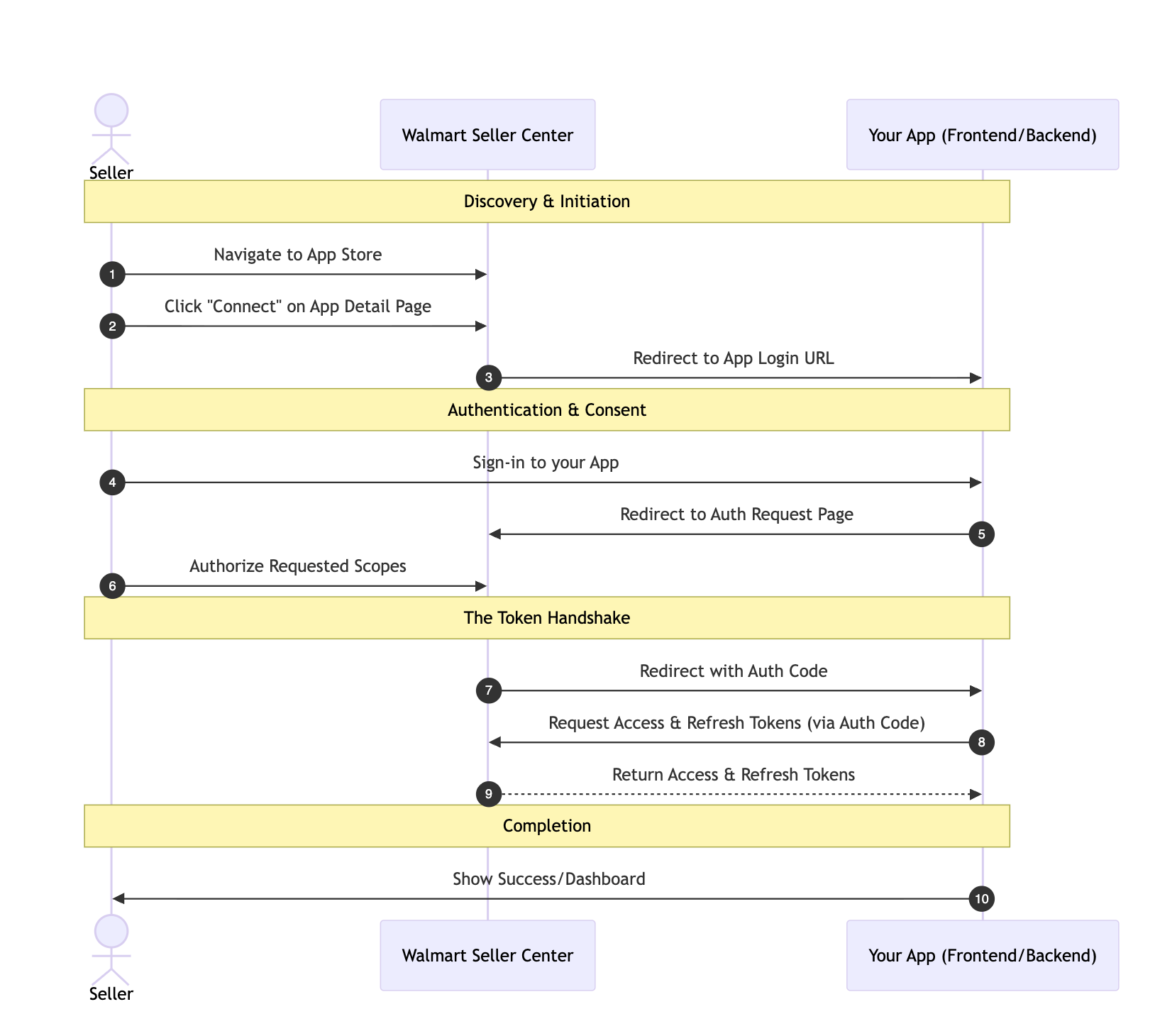
This section illustrates the authorization workflow with a diagram and provides detailed descriptions of each step in the application connection process. The overview below maps directly to the detailed steps that follow.
- The seller finds and connects an approved solution provider in Seller Center. (Step 1)
- The seller signs in and authorizes the application. (Step 2)
- Walmart authenticates the seller and redirects the browser to the solution provider with an authorization code. (Step 3)
- The solution provider exchanges the authorization code for an access token and refresh token. (Step 3a–3b)
- The solution provider uses the access token to make API calls on behalf of the seller.
- When the access token expires, the solution provider uses the refresh token to obtain a new access token. (Step 3c–3d)
Workflow process diagram
This diagram explains the authorization process between the Walmart app store on Seller Center and Authorization servers:
Step 1: Find and connect an approved Solution Provider (Seller)
After logging in to Walmart Seller Center, you can explore applications that are part of the Walmart Marketplace ecosystem.
To connect an application and initiate the OAuth flow:
- Log in to Walmart Seller Center.
- Navigate to Apps.
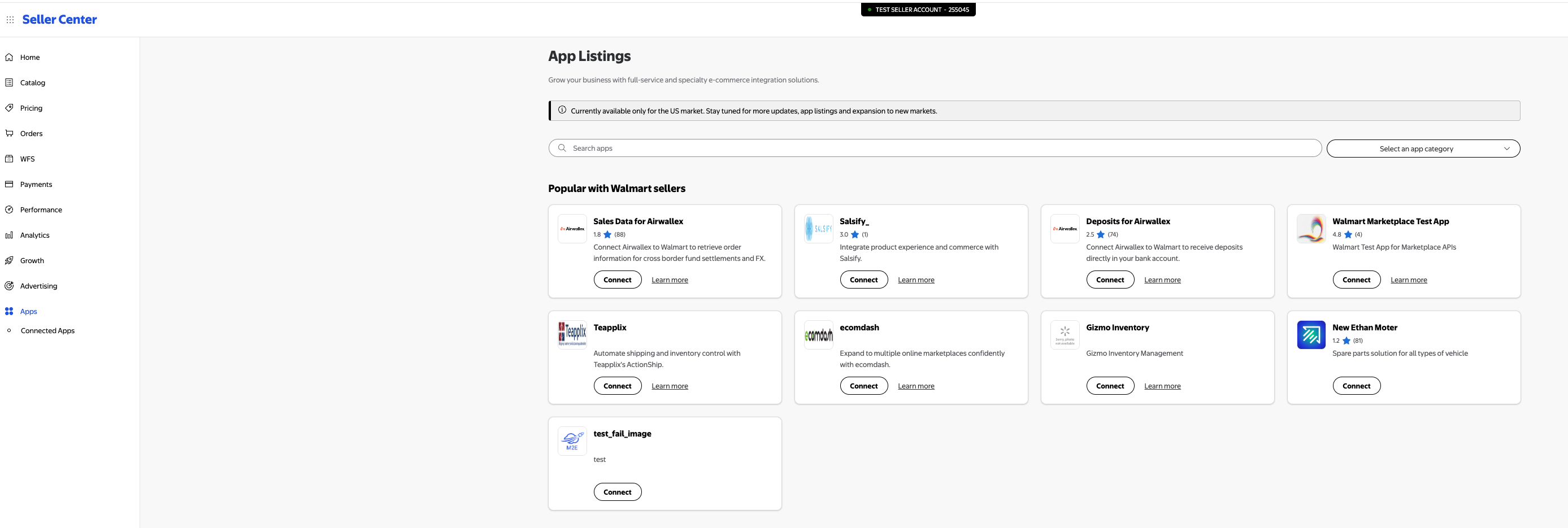
- Choose an app and click Connect.
After you click connect, Walmart loads the approved solution provider’s App Log-in URL, gathered via the application registration process, into your web browser, by adding the following query parameter:
| Parameter | Description |
|---|---|
| walmartCallbackUri | Walmart authorization server URL |
| clientType | (1) For the US marketplace: clientType=seller. (2) Other marketplace locations: clientType=seller-{market} where {market} field can be ca or mx.ca: Canada; mx: Mexico |
For example:
https://example-client-app.com/login?walmartCallbackUri=https://login.account.wal-mart.com/authorize
Step 2: Sign in and authorize access (Seller)
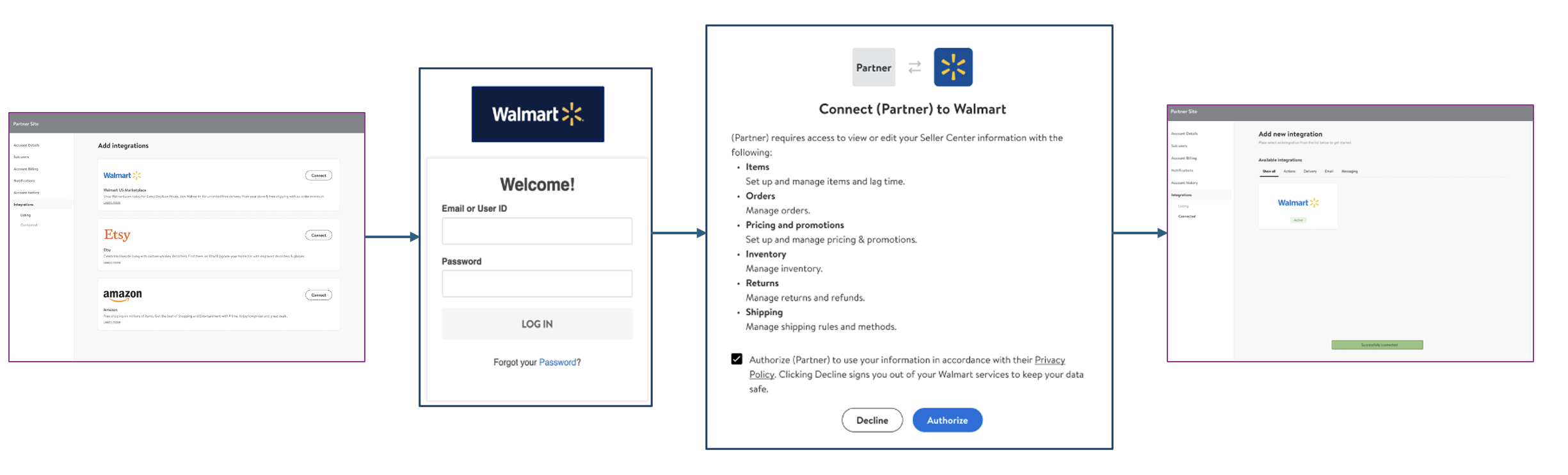
- Sign in to the approved Solution Provider's partner site.
- Select Walmart under Integrations.
- Sign in to Walmart Seller Center with your access credentials.
- Select Authorize to connect the partner application to your Walmart Seller Center.
- After you are authorized, verify to ensure Walmart is added under Available integrations.
OAuth 2.0 flow illustration with Partner site entry
The App Log-in URL and Auth Callback URL might vary depending on applications. All parameters are mandatory unless specified as optional.
The approved solution provider redirects the seller’s browser to Walmart’s authorization endpoint with the following parameters:
| Parameter | Description |
|---|---|
| responseType | Indicates the OAuth grant type to be used. For authorization code grant type, reponseType=code |
| clientId | Pre-registered identifier that uniquely identifies a solution provider app |
| redirectUri | Auth Callback URL of the solution provider app |
| clientType | Type of client by marketplace locations. (1) For the US marketplace: clientType=seller; (2) Other marketplace locations: clientType=seller-{market} where {market} field can be ca or mx. ca: Canada; mx: Mexico |
| nonce | Random or pseudo random number used only once to prevent replay attacks. For example, L8VYPBYOO5. |
| state | Opaque value passed by the solution provider app to maintain a state between the request and the callback. Solution provider app should check for equality of state returned in the response and state that they send in the request |
For example:
The nonce is a randomly generated value used during the authorization redirect to prevent replay attacks. It is not required for token API calls. For example, 22e0688e, 91d86d9, or 1opjmhumpr. This parameter is utilized solely in the process of authorization redirect, providing an extra layer of security. It’s important to note that the nonce is not necessary for other API calls such as those involving access tokens or refresh tokens.
This video demonstrates where to find your connect your approved Solution Provider.In this video, we’ll show you how to find and connect with an approved Solution Provider and how to review the data you authorize them to access.
Step 3: Receive authorization code (Approved Solution provider)
After the seller grants access, Walmart redirects the browser to the solution provider’s Auth Callback URL with an authorization code.
| Parameter | Description |
|---|---|
| code | Authorization code that the solution provider app exchange for a refresh token |
| type | In this case, type=auth |
| clientId | Pre-registered identifier that uniquely identifies a solution provider app. The Walmart authorization server returns the same clientId that is passed by the app |
| state | The state value that is passed by the solution provider app |
| sellerId | Walmart identifier of the seller who is authorizing the solution provider app |
For example:
The Approved Solution Provider’s app:
- Validates the
statevalue - Stores the
sellerIdand the authorization code
Step 3a: Exchange authorization code for tokens (Solution provider)
The solution provider exchanges the authorization code for an access token and refresh token.
The solution provider’s app calls the Walmart API server to get the OAuth access token and refresh token using the authorization code, sellerId, and application credentials.
| Parameter | Description | Sample |
|---|---|---|
| WM_PARTNER.ID | SellerId received with authorization code in step 5. | 43423324 |
| WM_MARKET | Optional. Default: us (USA) Available marketplace location: us (USA), mx (Mexico) or ca (Canada) | us, mx or ca |
| Authorization | Basic authentication using clientId and client secret of your app. | Basic e3tjbGllbnRfaWR9fTp7e2XR9fQ== |
| Content-Type | Content type of the request body. | application/x-www-form-urlencoded |
| WM_CONSUMER.CHANNEL.TYPE | Optional. A unique ID to track the consumer request by channel. Use the Consumer Channel Type received during onboarding | |
| WM_QOS.CORRELATION_ID | A unique ID which identifies each API call and used to track and debug issues; use a random generated GUID for this ID | b3261d2d-028a-4ef7-8602-633c23200af6 |
| WM_SVC.NAME | Walmart Service Name | Walmart Marketplace |
Request body:
| Parameter | Description | Sample |
|---|---|---|
| grant_type | Type of grant requested | authorization_code |
| code | The authorization code received as part of step 5. | 65CA5DA313A549D49D15D3119D9AD85D |
| redirect_uri | This should be same as one of your URI provided while registering the app. | https://example-client-app.com |
Step 3b: Receive access token and refresh token response (Solution provider)
The Walmart API server returns the OAuth access token and refresh token.
The response includes access_token, refresh_token, token_type, and expires_in in JSON format.
| Parameter | Description | Sample |
|---|---|---|
| access_token | Access token to be used for accessing business APIs | eyJraWQiOiI1MWY3MjM0Ny0wYWY5LTRhZ…. |
| refresh_token | Token which should be used to refresh the access token. | APXcIoTpKMH9OQN……. |
| token_type | Token Type | Bearer |
| expires_in | Expiry time of the access token in seconds | 900 |
The solution provider’s app updates the sellerId and the authorization code mapping with the sellerId and refresh token to make requests to the Walmart Marketplace APIs.
Step 3c: Refresh access token (Solution provider)
- An access token expires after 15 minutes, so you must refresh a user’s access token when it expires. You can use the refresh token, obtained from the token API call using the authorization code grant type, to get a new access token. Refresh tokens remain valid for one year.
- Request URI: https://marketplace.walmartapis.com/v3/token
- Request method: POST
Request headers:
| Parameter | Description | Sample |
|---|---|---|
| WM_PARTNER.ID | Partner Id registered in Walmart marketplace to identify a seller | 43423324 |
| WM_MARKET | Optional. Default: us (USA) Available marketplace location: us (USA), mx (Mexico), or ca (Canada) | us, mx or ca |
| Authorization | Basic authentication using clientId and client secret of your app | Basic e3tjbGllbnRfaWR9fTp7e2XR9fQ== |
| Content-Type | Content type of the request body | application/x-www-form-urlencoded |
| WM_CONSUMER.CHANNEL.TYPE | Optional. A unique ID to track the consumer request by channel. Use the Consumer Channel Type received during onboarding | |
| WM_QOS.CORRELATION_ID | A unique ID which identifies each API call and is used to track and debug issues; use a random generated GUID for this ID | b3261d2d-028a-4ef7-8602-633c23200af6 |
| WM_SVC.NAME | Walmart Service Name | Walmart Marketplace |
Request body:
| Parameter | Description | Sample |
|---|---|---|
| grant_type | Type of grant requested | refresh_token |
| refresh_token | Refresh token received as the response of Authentication API | APXcIoTpKMH9OQN……. |
Step 3d: Receive new access token (Solution provider)
The response includes access_token, token_type and expires_in in JSON format.
| Parameter | Description | Sample |
|---|---|---|
| access_token | Access token to be used for accessing business APIs | eyJraWQiOiI1MWY3MjM0Ny0wYWY5LTRhZ…. |
| token_type | Token Type | Bearer |
| expires in | Expiry time of access token in seconds | 900 |
Summary
The authorization workflow enables secure, token-based access to Walmart Marketplace APIs without sharing seller credentials:
- A seller grants an approved solution provider access through OAuth 2.0 authorization.
- Walmart authenticates the seller and issues an authorization code.
- The solution provider exchanges the authorization code for an access token and refresh token.
- The solution provider uses the access token to call Walmart Marketplace APIs on behalf of the seller.
- Access tokens expire periodically and must be refreshed.
Updated 6 days ago